Safety Advice#
Warning
Never use Klippel hardware units at power sockets without protective earth contact! Always follow the Klippel Safety Instructions (klippel.de/support/safety-first.html)!
Make sure Klippel devices are used at power sockets with proper protective earth connection.
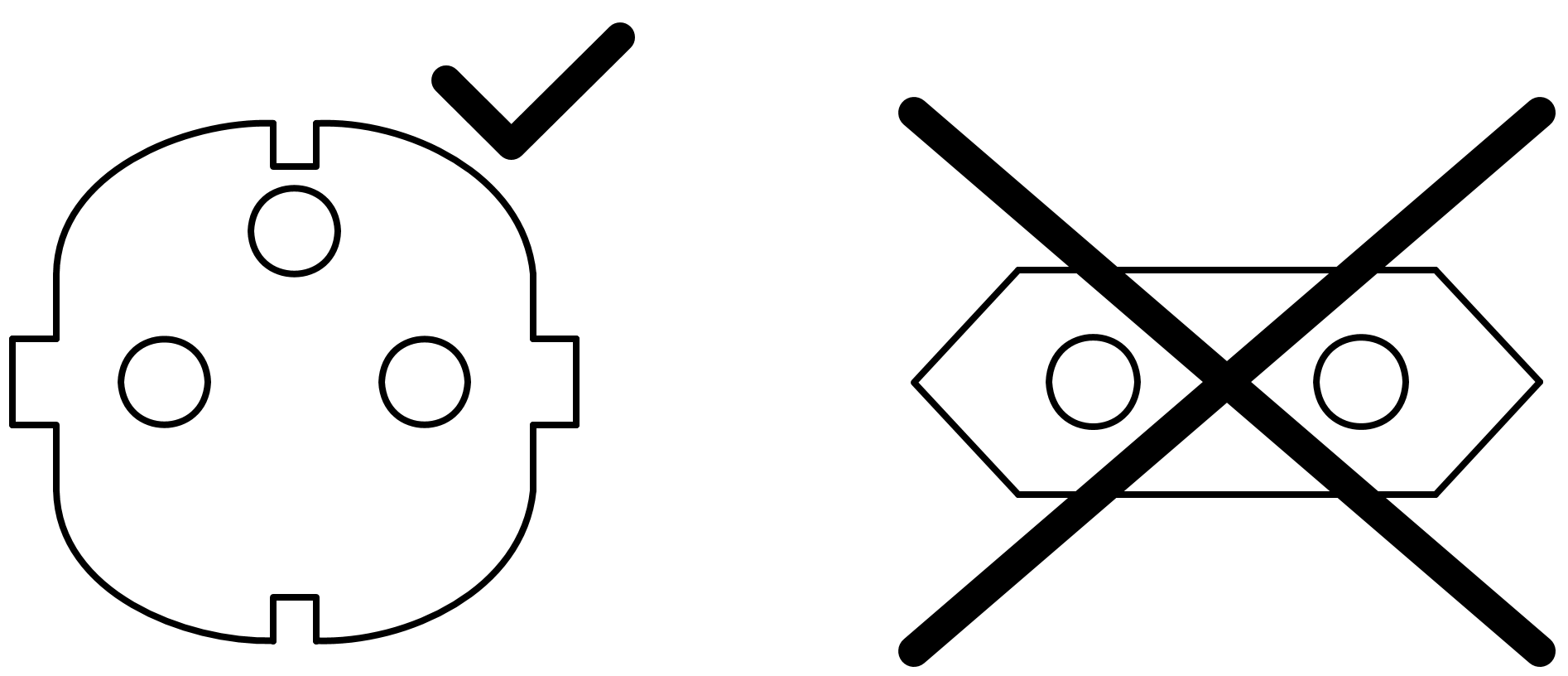
Two conductors with EARTH and two conductors without EARTH
KLIPPEL GmbH takes no responsibility for any kind of damage or injury caused by improper or unspecified usage.
Measurement device and used power amplifier should be connected to the same power socket to avoid ground loops.
For proper operation also the other devices such as laser, PC and so on should be connected to the same power socket.
For safe operation turn on the power amplifier last. Switch it off first or when changing the speaker cabling at any point.
If you have any problems, please contact KLIPPEL support: klippel.de/go/manuals#kl-contact-support
Safety Instructions for working with KLIPPEL Systems#

This is the Safety Alert Symbol. The symbol alerts you to potential hazards that can kill or injure you and / or others. All safety messages will follow the Safety Alert Symbol and either the words DANGER, WARNING or CAUTION.
Danger
means that failure to follow this safety statement will result in serious injury or death.
Warning
means that failure to follow this safety statement could result in serious injury or death.
Caution
means that failure to follow this safety statement may result in minor or moderate injury.
The safety messages in our user manual and on the appliances will alert you about the potential hazard, tell you how to reduce the chance of injury and let you know what can happen if the instructions are not followed.
All KLIPPEL Systems must be operated by skilled personnel only. The operator must read and understand the User Manuals. If you have any questions, please contact info@klippel.de
- Skilled personnel
People who are qualified and trained to work with electrical appliances and who have read and understood the user manual.
General instructions for testing and controlling loudspeakers#
Testing and controlling loudspeakers can be dangerous when reaching the physical limits or through operating errors.
Before you start read the instructions below as well as the health and safety instructions of the hardware you are working with. Failure to do so can result in injury or serious injury.
Electrical Devices#
Only use intact grounding type plugs for the power supply of all KLIPPEL electrical devices and connected 3rd party equipment!
High Voltage#
Danger
Do not touch metal parts of speaker or cable clamps! Power amplifiers may generate high voltages at the loudspeaker terminals. Hazard of electrical shock!
Fire proof environment#
Danger
During measurements loudspeakers heat up and can become very hot depending on the size of the loudspeaker and the measurement time. Allow some time after the measurement for the loudspeaker to cool down to prevent fingers, arms and other body parts from getting burned.
Only test loudspeakers in a fire proof environment and use clamping!
Working with Laser#
Warning
The laser beam can cause damage to your eye (retina). Possible subsequent damages are keratitis, pink eye and cataract up to corneal burns.
Avoid direct or indirect (reflection) exposure of human eyes to the laser beam!
Wear safety goggles to protect your eyes from laser beam.
Do not enter the laser beam with reflective surfaces such as mirrors or jewelry.
Warn everyone in the room before activating the laser (either acoustical or optical warning signal).
Do not leave active lasers unattended.
Modification Prohibited#
Do not modify or repair KLIPPEL hardware or accessories without authorization from KLIPPEL!
KLIPPEL is not responsible for any malfunction of unauthorized modified hardware/accessories.
Caution
Use original cables, power supply and spare parts only! If you do not use original parts then you risk damaging the unit even more as well as getting an electric shock.
Check Measurement Set up#
Caution
Check any measurement setups before executing the test. The user must assure a safe sound pressure level.
Use ear protection#
Caution
Protect your ears (i.e. wear hearing protection) when testing at high sound pressure level! Faulty usage of the measurement device can also cause sudden high notes which can damage your hearing ability.
Do not breathe in gas or smoke#
Caution
Gas and smoke can be generated by the loudspeaker at high voice coil temperature. Do not breathe in gas and/or smoke to protect your respiratory tracts.
Heavy Loudspeakers#
Caution
Make sure you have a steady position as well as a straight back when putting the loudspeaker into its position/removing it after measurement /testing.
An unstable position/bent back might result in you dropping the loudspeaker which can cause bruises, back pain, etc.
Cables#
Caution
To avoid the danger of stumbling or falling we advise you to fix cables along skirting boards or to use cable bridges.
Note
Please note, the results of measurements (measuring data, parameter, curves, PASS/FAIL decisions) depend on the measurement methods and the setup made by the user. The measurement methods are described in the KLIPPEL‘s specifications, papers and user manuals. KLIPPEL is not liable for any damage caused by interpretation or misinterpretation of measurement results.
Safety Instructions for specific units#
Near Field Scanner System#
Warning
The operator must read the User Manual carefully and must strictly follow all safety instructions!
The area of movement must be clearly marked and is restricted to authorized personnel.
Authorized personnel are employees who have read and understood the user manual or who were trained by authorized personnel.
No personnel is allowed within the restricted area while the machine is moving.
Make sure the Emergency Stop button is within reach of the operator during operation.
Regular safety checks must be carried out every 100 hours of operation.
Position (heavy) DUTs in the center of the platform!
If not positioned correctly the DUT might fall off the platform and cause injury or material damage.
Scanning with Vibrometer System#
Caution
SCN hardware moves the sensors and other mechanical parts automatically. Keep fingers or other body parts away from moving parts to avoid bruises. Make sure the Emergency Stop button is within reach of the operator during operation.
Driver Stand#
Caution
Use one-hand operation carefully! For further information on one hand operation see the hardware manual for the Pro Driver Stand.
Do not bruise fingers or other body parts!
Working with Vacuum#
Caution
Wear safety goggles and gloves when working with vacuum!
Make sure nothing can hit the acrylic glass plate when vacuum is applied!
Do not work with vacuum chamber when the acrylic glass is damaged!
The glass could break and cause injuries such as deep cuts and bruises.
When releasing the vacuum keep all objects and body parts in a safe distance from the air intake.
Open the valve slowly, when releasing the vacuum! If the vacuum is released too fast, it can damage small loudspeakers.
Suspension Part Testing#
Caution
Put the fastening tool on the guiding rod when running SPM tests to avoid expelling clamping parts! Expelling clamp parts can cause injury or material damage.
Interfacing software to 3rd party products (IO-Monitor -QC Software, Automation Software)#
Apply protection algorithms to avoid any malfunction of 3rd party software due to
malfunction in interfaces,
unexpected freeze of Klippel software,
unknown state during initialization and exit of Klippel software interfaces.
Interfacing hardware to 3rd party products (GPIO Connector at PA hardware)#
Apply protection algorithms / circuits to avoid any malfunction of peripheral equipment due to
malfunction in interfaces,
unknown behavior in inactive state (device switched off and during switching process),
impact of electro-magnetic interference,
unstable power supply.
Annual Safety Check#
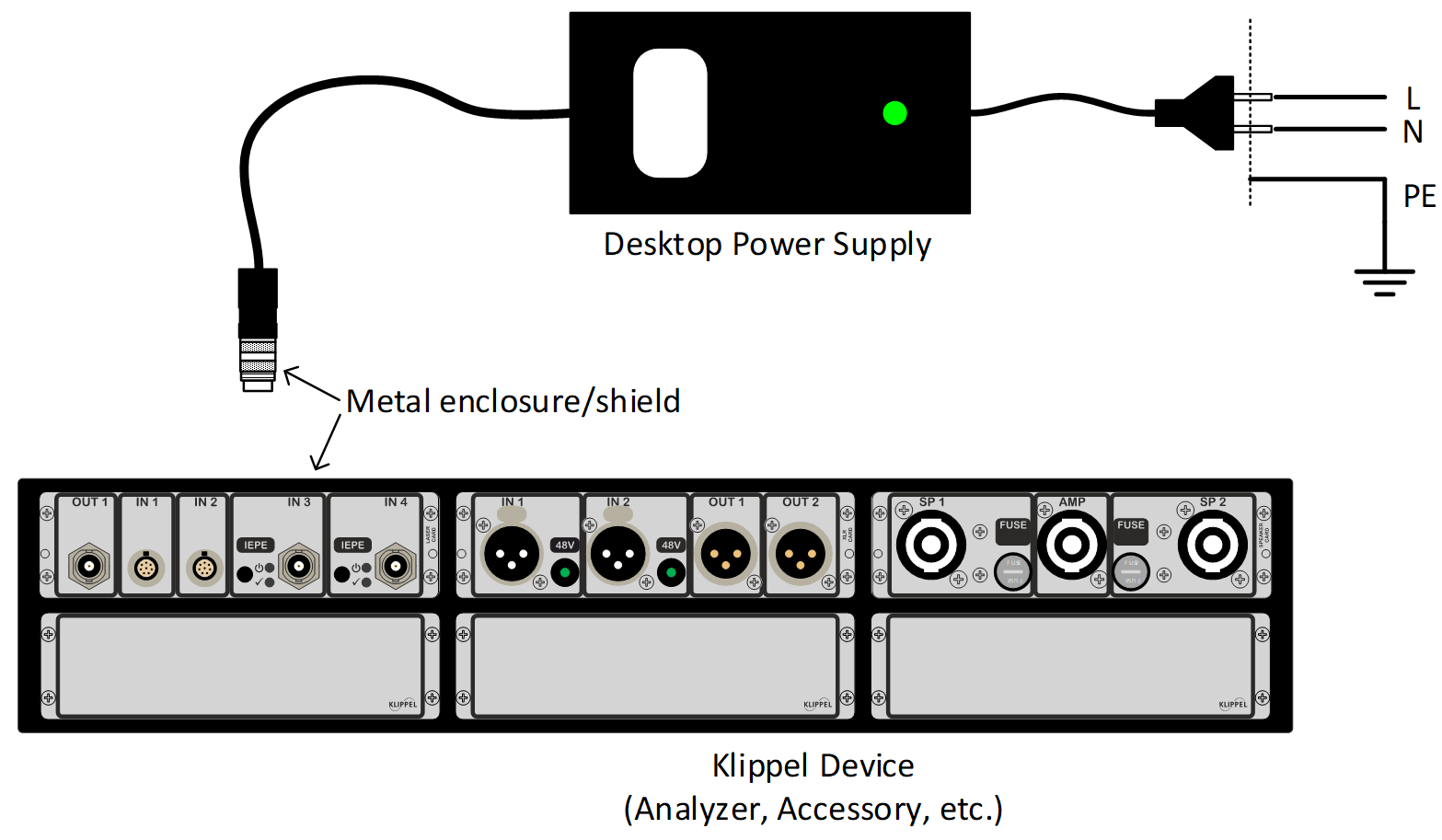
External power supplies of Klippel devices are of appliance class I. AC mains end has to be connected to sockets with protective earth! Klippel devices are operated from ELV (Extra Low Voltage) with functional earth connection, hence are not part of appliance class I. Following procedure describes the required steps for annular safety check:
Disconnect all cables from the Klippel device but keep the external power supply cord connected
Visually inspect the device, cords and connectors for any damage, broken isolation or other safety relevant defects
Turn on the Klippel Device if it has a power switch
Perform an isolation check from neutral and line wire to all accessible metal parts
Perform a PE current check by checking the current from line/neutral to PE
Optional:#
Check functional ground connection from Klippel device enclosure to PE.
Warning
Do not use test currents higher than 200mA for functional ground check! Higher currents may damage the external power supply, sacrificing the performance of the Klippel device.
Note
Step 4 covers electrical isolation check from accessible metal parts to line and neutral as well as verification of isolation barrier from primary (AC mains) to secondary (Klippel device) side.